Overview
The ConversionRate Academy Calendar is your central hub for upcoming training sessions, live clinics, workshops, and community events.
By following the calendar, you'll automatically receive updates about new events and schedule changes directly in your preferred calendar application, helping you stay on top of valuable learning opportunities without needing to check the Academy manually.
Live clinics are designed to provide hands-on guidance, actionable feedback, and direct access to experts who can help you improve your conversion rates, marketing strategies, and store performance.
Why Follow the Calendar?
Following the ConversionRate Academy calendar offers several benefits:
Never Miss an Event
Receive automatic reminders for upcoming clinics, workshops, and training sessions.
Stay Up to Date
Any updates or newly scheduled events can sync directly to your calendar, ensuring you always have the latest schedule.
Improve Learning Consistency
Adding events to your personal calendar makes it easier to build a regular learning routine and stay engaged with the Academy.
Access Expert Guidance
Many clinics provide opportunities to learn directly from experienced practitioners, ask questions, and receive practical advice that can be applied to your business.
How to Follow the Calendar
Step 1: Navigate to the Calendar
Within ConversionRate Academy:
Calendar → Calendar View
You will see the full event schedule displayed in a monthly, weekly, or agenda-style view.
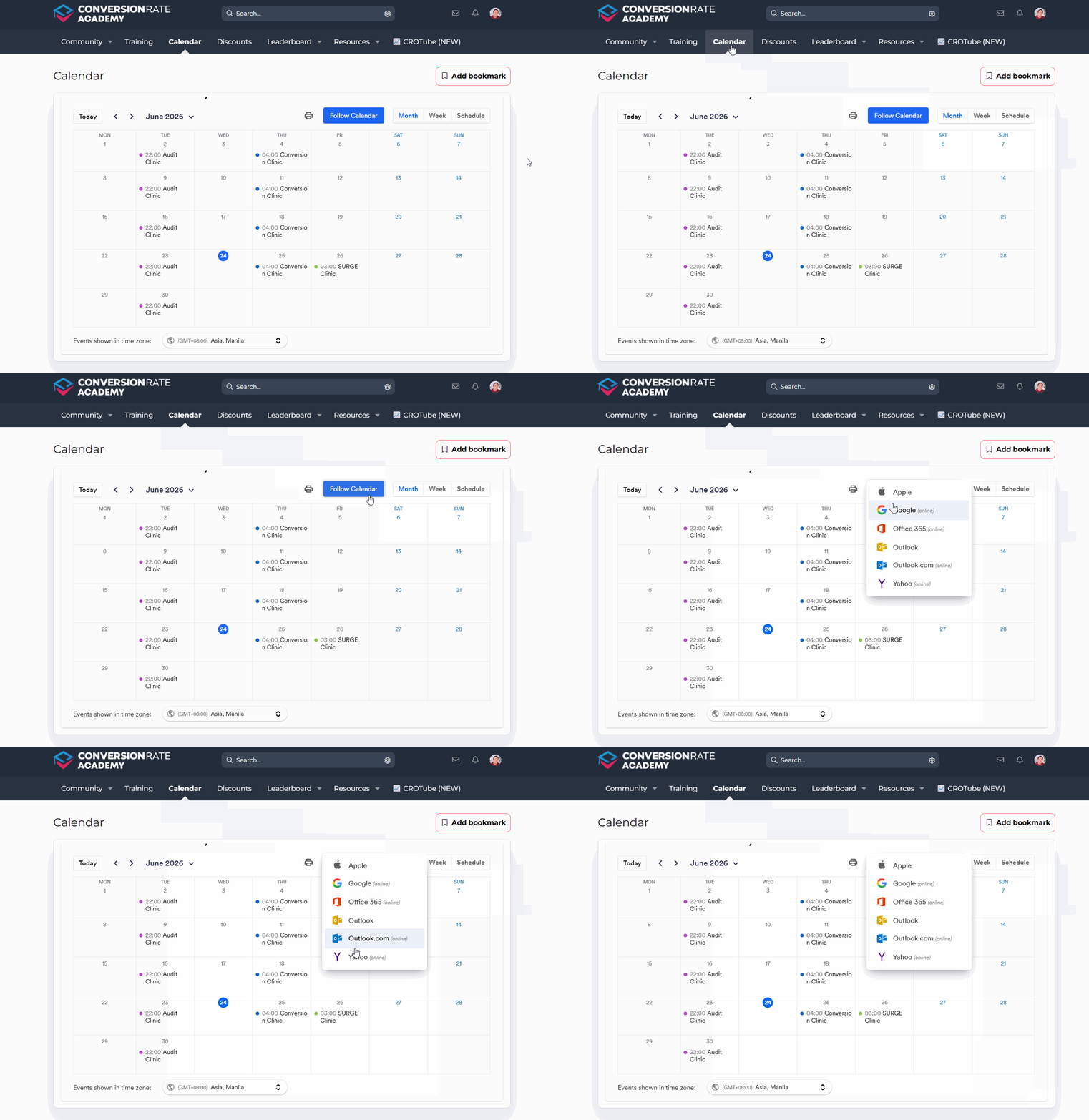
Step 2: Click "Follow Calendar"
Locate the Follow Calendar button near the top of the calendar.
Clicking this button will open a list of supported calendar platforms.
Step 3: Choose Your Preferred Calendar Application
Available options may include:
- Apple Calendar
- Google Calendar
- Office 365
- Outlook
- Outlook.com
- Yahoo Calendar
Select the platform you use most frequently.
Step 4: Complete the Subscription
After selecting your calendar provider:
- Follow the prompts provided by your calendar application.
- Confirm the subscription or calendar addition.
- Allow the calendar to sync.
Once completed, future ConversionRate Academy events will appear alongside your existing calendar events.
How to Join a Clinic
Step 1: Locate an Upcoming Clinic
Browse the calendar and look for scheduled events such as:
- Audit Clinics
- Conversion Clinics
- SURGE Clinics
- Training Sessions
- Special Workshops
Each event will appear on its scheduled date and time.
Step 2: Open the Event
Click on the clinic event within the calendar.
This will open additional information about the session, including:
- Topic and agenda
- Date and time
- Meeting details
- Registration or joining instructions
Step 3: Register (If Required)
Some clinics may require registration before attendance.
If registration is needed:
- Click the registration link.
- Complete any required information.
- Watch for a confirmation email with joining instructions.
Step 4: Attend the Session
At the scheduled time:
- Open the event from your calendar or confirmation email.
- Click the meeting link.
- Join the session and participate in the discussion.
To get the most value from a clinic, come prepared with questions, examples, or specific challenges you'd like help solving.
What Makes the Clinics Valuable?
The clinics are designed to go beyond traditional training by focusing on practical implementation and real-world problem solving.
Benefits include:
- Learning directly from experienced conversion optimization professionals.
- Receiving actionable recommendations you can implement immediately.
- Understanding how others approach similar challenges.
- Discovering new strategies, tools, and best practices.
- Staying informed about the latest updates, trends, and opportunities within the ConversionRate Academy ecosystem.
- Building momentum through consistent learning and accountability.
Whether you're new to optimization or already running an established store, regular clinic attendance can help accelerate your progress and provide fresh perspectives on your business.
Pro Tip
Subscribe to the calendar using the calendar application you check every day. This ensures clinic reminders appear alongside your personal and work commitments, making it far less likely that you'll miss valuable training sessions.
Additionally, consider joining clinics live whenever possible. While recordings can be helpful, attending live allows you to ask questions, participate in discussions, and receive guidance tailored to your specific situation.
You're All Set!
You now know how to follow the ConversionRate Academy calendar and join upcoming clinics. By subscribing to the calendar and attending sessions regularly, you'll be able to stay connected with the Academy, learn from industry experts, and continuously improve your skills and results.
If you have any questions or need assistance accessing the calendar or joining a clinic, please contact our team at support@conversionrateacademy.com and we'll be happy to help.
Was this article helpful?
That’s Great!
Thank you for your feedback
Sorry! We couldn't be helpful
Thank you for your feedback
Feedback sent
We appreciate your effort and will try to fix the article