Overview:
Reporting bugs helps us identify and fix issues quickly, ensuring the Surge theme works seamlessly for everyone. This guide will walk you through creating a detailed and effective bug report in the Conversion Rate Academy community.
Steps to Submit a Surge Theme Bug Report
Navigate to the Surge Discussion Forum
Log in to your CRA account.
Go to Community > SURGE.
Here, you’ll find sections like Suggestions and Bug Reporting.
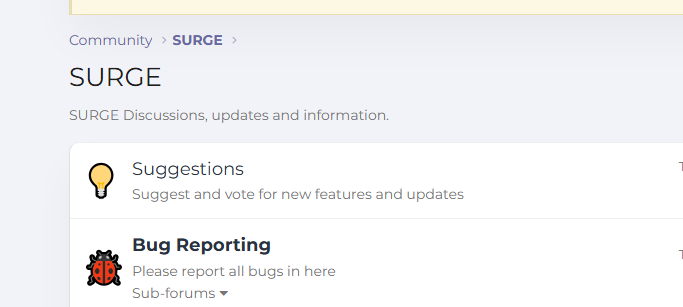
Select the Bug Reporting Section
Click on Bug Reporting to view existing reports.
This helps avoid duplicate submissions and allows you to see if your issue has already been reported.
If your bug relates to a sub-feature, you can check any Sub-forums under Bug Reporting.
Click “Post Thread”
Press the Post thread button on the top right of the page.
This will open a new bug report form.
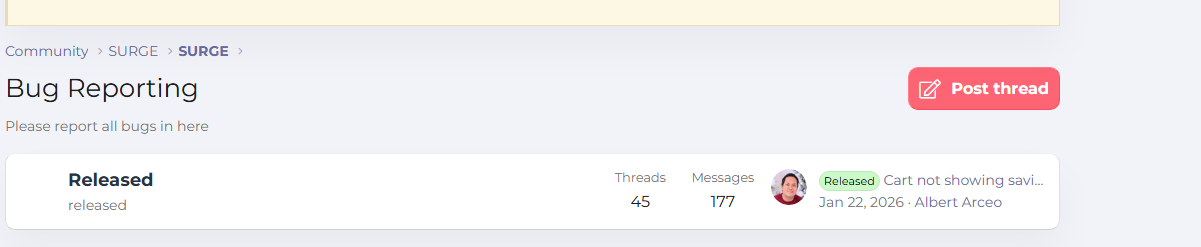
Fill in the Bug Report Details
Include the following information to help us reproduce and fix the issue quickly: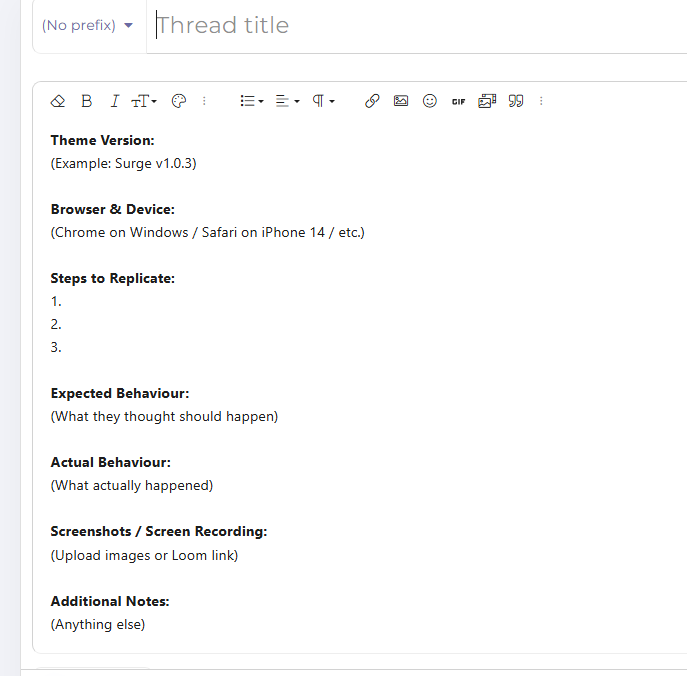 Title: A short, descriptive summary of the problem (e.g., “Sticky Mobile Add-to-Cart Button Not Displaying”).
Description:
Steps to reproduce the issue.
Expected outcome vs. actual outcome.
Screenshots or screen recordings (if possible).
Environment:
Browser and version.
Device type (desktop, mobile, tablet).
Surge theme version.
Add Any Relevant Tags or Labels
Use tags like bug, mobile, desktop, or feature if available.
This helps our team prioritize and categorize reports efficiently.
Submit Your Bug Report
Review all the information you’ve provided.
Click Submit or Post Thread to send your bug report.
Tips for a Useful Bug Report
Be as detailed as possible — include every step needed to reproduce the issue.
Attach screenshots or videos to visually demonstrate the problem.
Check existing bug reports first to avoid duplicates.
If the bug affects a live store or urgent functionality, mark it clearly in your description.
Need More Help?
If you have any questions about submitting a bug report or using the Surge theme, you can create a support ticket or post directly in the CRA community.
Was this article helpful?
That’s Great!
Thank you for your feedback
Sorry! We couldn't be helpful
Thank you for your feedback
Feedback sent
We appreciate your effort and will try to fix the article