Overview
The Community Menu inside Conversion Rate Academy by ConversionWise is where members can engage with other marketers, ecommerce founders, and CRO specialists. It serves as the central hub for discussions, questions, knowledge sharing, and collaboration.
Through the community, members can ask questions, participate in conversations, learn from real-world experiences, and stay updated with important announcements.
Below is an example of the Community Menu and discussion dashboard.
Accessing the Community Menu
To open the Community Menu:
Navigate to the top navigation bar.
Click Community.
A dropdown menu will appear with several navigation options.
These tools help you quickly find discussions, track your activity, and explore conversations across the academy.
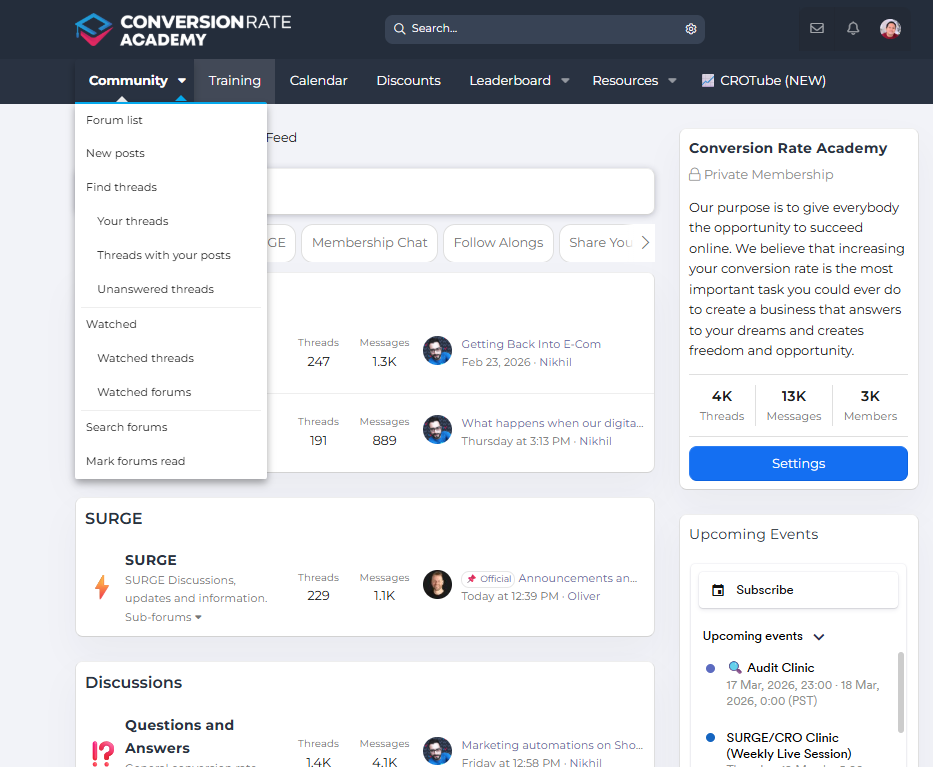
Community Menu Options Explained
Forum List
Displays the full list of community forums where different topics are organized.
Examples include:
Surge discussions
General CRO questions
AI and emerging tools
Marketing conversations
This is the best place to browse all available discussion categories.
New Posts
Shows the latest posts and discussions created across the community.
Use this option to quickly see:
Newly created topics
Recent replies
Active discussions
This helps you stay up-to-date with the latest conversations.
Find Threads
Allows you to search for specific discussions or topics inside the community.
You can use this feature to locate:
Past conversations
Specific CRO questions
Technical discussions
Your Threads
Displays all the threads you have personally created.
This makes it easy to track:
Questions you've posted
Discussions you've started
Responses from other members
Threads With Your Posts
Shows discussions where you have previously participated.
This allows you to quickly revisit conversations and follow updates.
Unanswered Threads
Lists topics that have not yet received replies.
This is a great place to:
Help other members
Share your expertise
Start new discussions
Watched Threads
Displays discussions you are actively following.
When you watch a thread, you'll receive updates when new replies are posted.
Watched Forums
Shows forums you have chosen to follow for updates.
This allows you to monitor activity in specific categories.
Search Forums
Lets you perform a targeted search across all community forums.
This is useful when you're looking for:
Previous CRO discussions
Platform-specific help
Marketing strategy insights
Mark Forums Read
This option marks all current posts as read, helping reset your notification view and focus only on new content.
Benefits of the Community
The Conversion Rate Academy Community provides several valuable benefits:
Learn From Real Experiences
Members share real ecommerce challenges and solutions, giving you practical insights you can apply immediately.
Get Expert Feedback
You can ask questions and receive guidance from experienced marketers and CRO specialists.
Discover New Optimization Strategies
Community discussions often highlight new tools, testing ideas, and optimization frameworks.
Build Valuable Connections
The community allows you to connect with other founders, marketers, and ecommerce professionals.
Tips for Getting the Most Out of the Community
Introduce yourself when joining the academy
Search existing threads before posting a new question
Share your own experiences and insights
Follow threads that are relevant to your goals
Active participation helps you learn faster and gain more value from the academy.
✅ Need help?
If you have questions about using the community or navigating the academy, please create a support ticket or contact the team at support@conversionwise.com.
The team at ConversionWise will be happy to assist you.
Was this article helpful?
That’s Great!
Thank you for your feedback
Sorry! We couldn't be helpful
Thank you for your feedback
Feedback sent
We appreciate your effort and will try to fix the article