Overview
You can easily access and download invoices for your Conversion Rate Academy membership directly from your Academy member portal. The same portal also allows you to view your active subscription details.
This guide will show you where to find both your payment history and your current subscription.
How to Download Your Invoices
- Log in to your Academy member account:
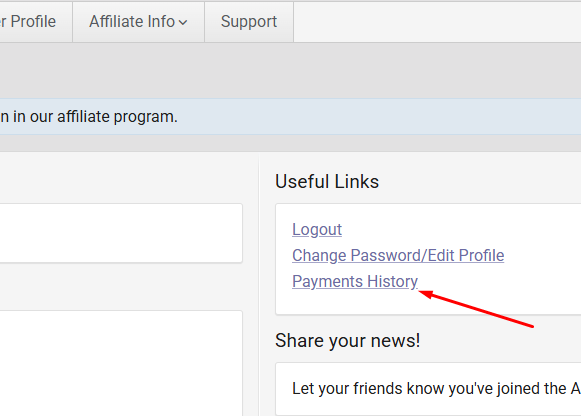
https://conversionrateacademy.com/membership/member - Once you're on your member dashboard, locate the Useful Links section on the right-hand side.
- Click Payment History.
- You'll see a list of all your completed payments.
- Select the payment you'd like to view and download the corresponding invoice.
Tip: If you don't immediately see the Useful Links section, try scrolling down the page or viewing the dashboard on a desktop browser.
How to View Your Active Subscription
If you'd like to check your current Academy subscription:
- Log in to your Academy member account:
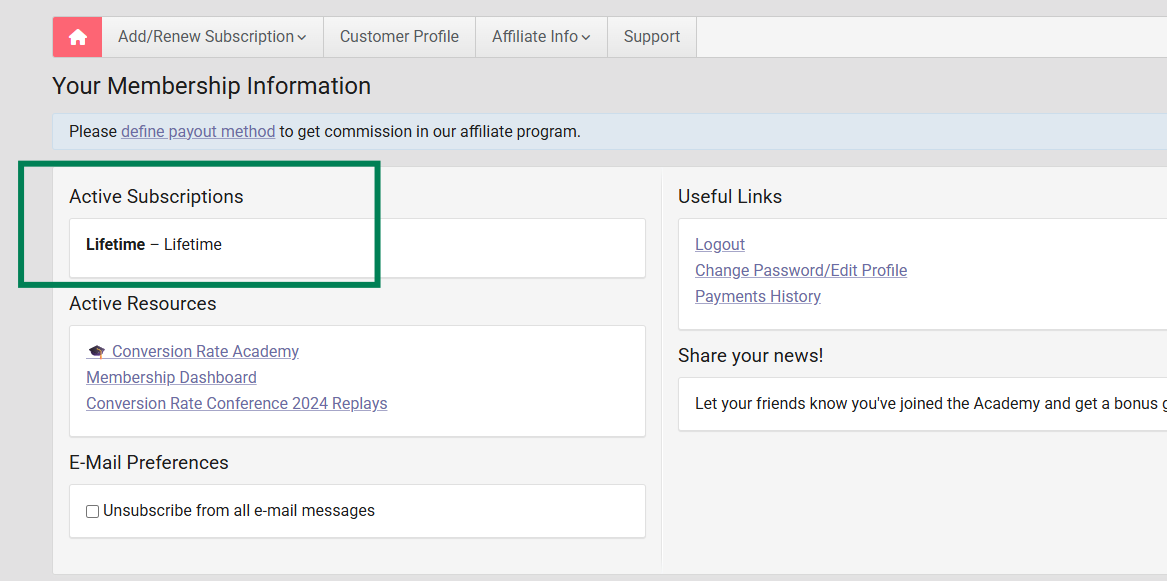
https://conversionrateacademy.com/membership/member - Scroll to the Active Subscriptions section.
That's It!
Your invoices can be downloaded anytime from the Payment History page, and your current membership details are always available under Active Subscriptions in your Academy portal.
If you have any questions or need additional assistance accessing your invoices or subscription information, please don't hesitate to contact our support team at support@conversionwise.com. We're always happy to help!
Was this article helpful?
That’s Great!
Thank you for your feedback
Sorry! We couldn't be helpful
Thank you for your feedback
Feedback sent
We appreciate your effort and will try to fix the article